 This time of year, we are surrounded by discounts. 40% off here. 80% off there. I always wonder to myself, does it really make any difference? If you save $35 on a $50 sweater, you feel good that you got a bargain. But where does that “savings” go? Are you actually any richer? Don’t you just go out and buy more stuff? Does chasing all these sales actually help or hurt your net worth?
What if, every time you bought something with a discount and think “Oh I totally needed that anyway and I saved $20!”, you immediately transferred $20 into a savings account. That way, you will have actually put $20 aside instead of the vague notion of “I saved $20”. Eventually, you can invest that money into productive assets like stocks or a house downpayment. This leads to my brainstorming question…
What is the easiest way to transfer money into a savings account “piggy bank”?
Digit Savings Text Bot. This is my current favorite. Once you have it all set up, I just text Digit the words “save 6 bucks” and it will move $6 from my linked checking account into my Digit savings account. You can even play around with the language, you know, if you’re a goofball like me. Here’s a screenshot:

You don’t even technically need a smartphone or a cellular data plan for this app to work, just SMS text capability. I can also have it work on my laptop through my Apple Messages app. See my Digit review for more details on their auto-saving feature.
Dobot (“Dough-bot”) is another similar saving bot app that I am trying out right now, and they are offering a $5 new user bonus (If you get $5, I get $5 too). However, everything is done in-app and not through text.
Online Bank App. Most online banks have smartphone apps, and even better is the fact that most will now let me log in using my fingerprint. I tested out a $5 transfer from my checking to savings account using the Ally Bank app and I counted 13 taps total. Here’s a quick screenshot.

Using the bank app was certainly not difficult, but texting Digit simply felt more natural. Keep in mind that you can have unlimited transfers from Ally checking to savings, but per federal bank regulations, you can only make 6 outgoing transfers per month from any bank savings account.
Pen and paper. Write your discount savings in a notebook or scrap of paper, and then add them up later at the end of the day, week, or month and initiate a transfer. Seems simple enough, but in the real world that delay would mean that I wouldn’t do it.
Siri, Google Assistant, or Amazon Alexa? Perhaps the easiest way would be to just say “Hey Scary AI Robot, send $5 into savings for me” and it would transfer from my checking to savings. You’d have to add in some security firewalls so the transfers only go between internal bank accounts (and not some hacker’s bank account). I don’t know of any actual setups that would do this, but I did see that Alexa already has some limited integration with Capital One.
 Updated with online maturity information and screenshots. If you have money in a bank certificate of deposit (CD), you should be aware that most of them will renew automatically for the same term length upon maturity. That means if you don’t specifically tell them otherwise, your 5-year CD will roll over for another 5 years if you’re caught snoozing during the grace period. Different banks set different grace period lengths and renewal instructions; the best ones in my opinion let you set the decision ahead of time (i.e. Pentagon Federal Credit Union).




 Updated. Although I originally wrote this post a few years ago, it (unfortunately) still gets regular traffic. Bank reforms instituted in 2010 made overdraft “protection” only applicable on an opt-in basis on ATM/debit card usage. Despite this fact, U.S. banks still collected over $6 billion dollars in overdraft fees in 2015.
 Here is an updated link to the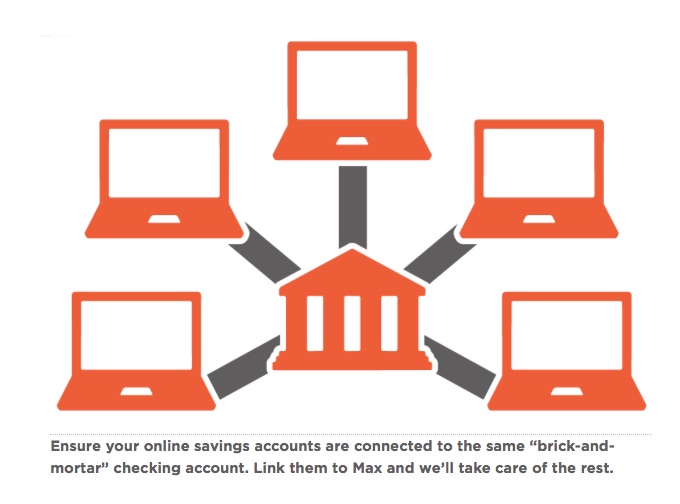

 The Best Credit Card Bonus Offers – 2026
 Big List of Free Stocks from Brokerage Apps
 Best Interest Rates on Cash - 2026
 Free Credit Scores x 3 + Free Credit Monitoring
 Best No Fee 0% APR Balance Transfer Offers
 Little-Known Cellular Data Plans That Can Save Big Money
 How To Haggle Your Cable or Direct TV Bill
 Big List of Free Consumer Data Reports (Credit, Rent, Work)